Ansible - Inventory
Ansible bruker Inventory-fil for å vite hvilke hoster du har i din ifrastruktur.
Inventory-filen er i INI-format eller YAML-format og kan inneholde grupper og variabler.
I lab miljøet har jeg en WSL Ubuntu 22.04 og en Cisco CML2 server.
Det er 2 ios switcher, 2 ios xe switcher, 2 ios xe routere og 1 ios ruter i laben.
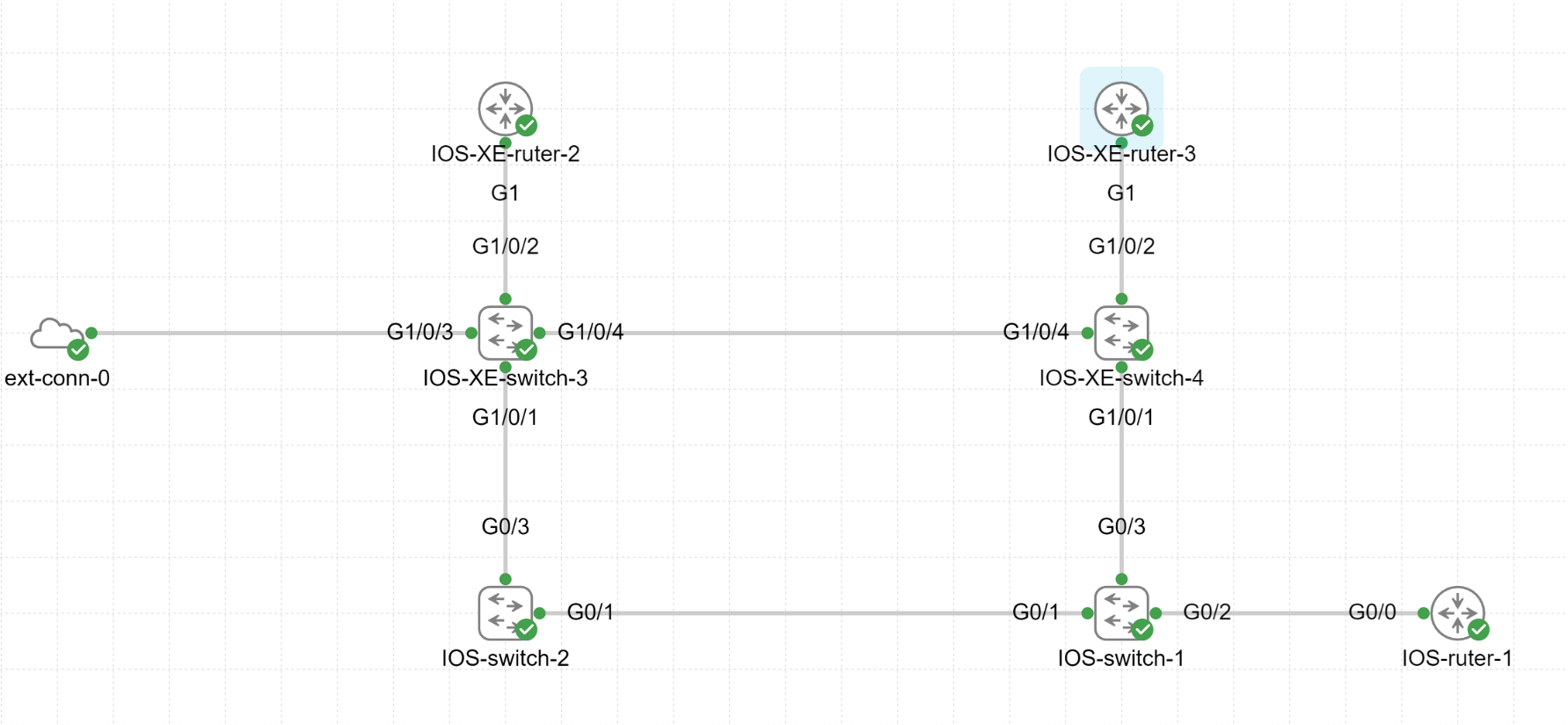
Under kan du se en eksempel på en Inventory-fil i INI-format og YAML-format for alle nodene i laben.
Filen er i INI-format eller YAML-format og kan inneholde grupper og variabler.
Unngå mellomrom, bindestreker og foregående tall i grupper
Det fungerer men du får en feilmelding når du kjører ansible-playbook kommandoen.
[WARNING]: Invalid characters were found in group names but not replaced, use -vvvv to see details
I INI-format ser filen slik ut:
[IOS_switch_1]
IOS_switch_1 ansible_host=10.170.0.231

[IOS_switch_2]
IOS_switch_2 ansible_host=10.170.0.232

[IOS_XE_switch_3]
IOS_switch_3 ansible_host=10.170.0.233

[IOS_XE_switch_4]
IOS_XE_switch_4 ansible_host=10.170.0.234

[IOS_ruter_1]
IOS_ruter_1 ansible_host=10.170.0.251

[IOS_XE_ruter_2]
IOS_XE_ruter_2 ansible_host=10.170.0.252

[IOS_XE_ruter_3]
IOS_XE_ruter_3 ansible_host=10.170.0.253
I YAML-format ser filen slik ut:
all:
  hosts:
    IOS_switch_1:
      ansible_host: 10.170.0.231
    IOS_switch_2:
      ansible_host: 10.170.0.232
    IOS_XE_switch_3:
      ansible_host: 10.170.0.233
    IOS_XE_switch_4:
      ansible_host: 10.170.0.234
    IOS_ruter_1:
      ansible_host: 10.170.0.251
    IOS_XE_ruter_2:
      ansible_host: 10.170.0.252
    IOS_XE_ruter_3:
      ansible_host: 10.170.0.253
Det finnes to spesielle grupper i Ansible Inventory-filen: all og ungrouped.
Gruppen all inneholder alle hoster i Inventory-filen.
Gruppen ungrouped inneholder alle hoster som ikke er i noen gruppe.
ansible-inventory -i inventory_enkel.yaml --list
{
    "_meta": {
        "hostvars": {
            "IOS_XE_ruter_2": {
                "ansible_host": "10.170.0.252"
            },
            "IOS_XE_ruter_3": {
                "ansible_host": "10.170.0.253"
            },
            "IOS_XE_switch_3": {
                "ansible_host": "10.170.0.233"
            },
            "IOS_XE_switch_4": {
                "ansible_host": "10.170.0.234"
            },
            "IOS_ruter_1": {
                "ansible_host": "10.170.0.251"
            },
            "IOS_switch_1": {
                "ansible_host": "10.170.0.231"
            },
            "IOS_switch_2": {
                "ansible_host": "10.170.0.232"
            }
        }
    },
    "all": {
        "children": [
            "ungrouped"
        ]
    },
    "ungrouped": {
        "hosts": [
            "IOS_switch_1",
            "IOS_switch_2",
            "IOS_XE_switch_3",
            "IOS_XE_switch_4",
            "IOS_ruter_1",
            "IOS_XE_ruter_2",
            "IOS_XE_ruter_3"
        ]
    }
}
Med kommandoen ansible-inventory -i inventory_enkel.yaml --list kan du se alle hoster i Inventory-filen.
I eksempelet over ser du at det er 7 hoster i Inventory-filen. De er i gruppen ungrouped.
Hvis du vil se hoster i en spesifikk gruppe kan du bruke kommandoen ansible-inventory -i inventory_enkel.yaml --list -y --yaml --graph.
Du kan bruker andre kommandoer for å inspisere Inventory-filen.
ansible-inventory -i inventory_enkel.yaml --graph viser en grafisk representasjon av Inventory-filen.
ansible-inventory -i inventory_enkel.yaml --vars viser alle variabler i Inventory-filen.
ansible-inventory -i inventory_enkel.yaml --host IOS-switch-1 viser informasjon om hosten IOS-switch-1.
Du kan også bruke ansible-inventory -i inventory_enkel.yaml --list -y --yaml for å se hoster i YAML-format.
Eller ansible-inventory -i inventory_enkel.yaml --list -y --yaml --graph for å se hoster i YAML-format og grafisk representasjon.
Gruppering i Inventory-filen
For å gruppere hoster i Inventory-filen kan du bruke grupper.
I INI-format ser filen brukes det [gruppenavn] for å gruppere hoster.
[IOS_switcher]
IOS_switch_1 ansible_host=10.170.0.231
IOS_switch_2 ansible_host=10.170.0.232

[IOS_XE_switcher]
IOS_XE_switch_3 ansible_host=10.170.0.233
IOS_XE_switch_4 ansible_host=10.170.0.234

[IOS_rutere]
IOS_ruter_1 ansible_host=10.170.0.251

[IOS_XE_rutere]
IOS_XE_ruter_2 ansible_host=10.170.0.252
IOS_XE_ruter_3 ansible_host=10.170.0.253
I YAML-format ser filen slik ut:
IOS_switcher:
  hosts:
    IOS_switch_1:
      ansible_host: 10.170.0.231
    IOS_switch_2:
      ansible_host: 10.170.0.232

IOS_XE_switcher:
  hosts:
    IOS_XE_switch_3:
      ansible_host: 10.170.0.233
    IOS_XE_switch_4:
      ansible_host: 10.170.0.234

IOS_rutere:
  hosts:
    IOS_ruter_1:
      ansible_host: 10.170.0.251

IOS_XE_rutere:
  hosts:
    IOS_XE_ruter_2:
      ansible_host: 10.170.0.252
    IOS_XE_ruter_3:
      ansible_host: 10.170.0.253
ansible-inventory -i inventory_grupper.yaml --list
{
    "IOS_XE_rutere": {
        "hosts": [
            "IOS_XE_ruter_2",
            "IOS_XE_ruter_3"
        ]
    },
    "IOS_XE_switcher": {
        "hosts": [
            "IOS_XE_switch_3",
            "IOS_XE_switch_4"
        ]
    },
    "IOS_rutere": {
        "hosts": [
            "IOS_ruter_1"
        ]
    },
    "IOS_switcher": {
        "hosts": [
            "IOS_switch_1",
            "IOS_switch_2"
        ]
    },
    "_meta": {
        "hostvars": {
            "IOS_XE_ruter_2": {
                "ansible_host": "10.170.0.252"
            },
            "IOS_XE_ruter_3": {
                "ansible_host": "10.170.0.253"
            },
            "IOS_XE_switch_3": {
                "ansible_host": "10.170.0.233"
            },
            "IOS_XE_switch_4": {
                "ansible_host": "10.170.0.234"
            },
            "IOS_ruter_1": {
                "ansible_host": "10.170.0.251"
            },
            "IOS_switch_1": {
                "ansible_host": "10.170.0.231"
            },
            "IOS_switch_2": {
                "ansible_host": "10.170.0.232"
            }
        }
    },
    "all": {
        "children": [
            "ungrouped",
            "IOS_switcher",
            "IOS_XE_switcher",
            "IOS_rutere",
            "IOS_XE_rutere"
        ]
    }
}
For å lage grupper i grupper så kan du bruke children i Inventory-filen.
Eksempel av children grupper i ini-format
[switcher:children]
IOS_switcher
IOS_XE_switcher

[rutere:children]
IOS_rutere
IOS_XE_rutere

[IOS_switcher]
IOS_switch_1 ansible_host=10.170.0.231
IOS_switch_2 ansible_host=10.170.0.232

[IOS_XE_switcher]
IOS_XE_switch_3 ansible_host=10.170.0.233
IOS_XE_switch_4 ansible_host=10.170.0.234

[IOS_rutere]
IOS_ruter_1 ansible_host=10.170.0.251

[IOS_XE_rutere]
IOS_XE_ruter_2 ansible_host=10.170.0.252
IOS_XE_ruter_3 ansible_host=10.170.0.253
I YAML-format ser filen slik ut:
all:
children:
  switcher:
    children:
      IOS_switcher:
        hosts:
          IOS_switch_1:
            ansible_host: 10.170.0.231
          IOS_switch_2:
            ansible_host: 10.170.0.232
      IOS_XE_switcher:
        hosts:
          IOS_XE_switch_3:
            ansible_host: 10.170.0.233
          IOS_XE_switch_4:
            ansible_host: 10.170.0.234
  rutere:
    children:
      IOS_rutere:
        hosts:
          IOS_ruter_1:
            ansible_host: 10.170.0.251
      IOS_XE_rutere:
        hosts:
          IOS_XE_ruter_2:
            ansible_host: 10.170.0.252
          IOS_XE_ruter_3:
            ansible_host: 10.170.0.253